Where does an adapter go?
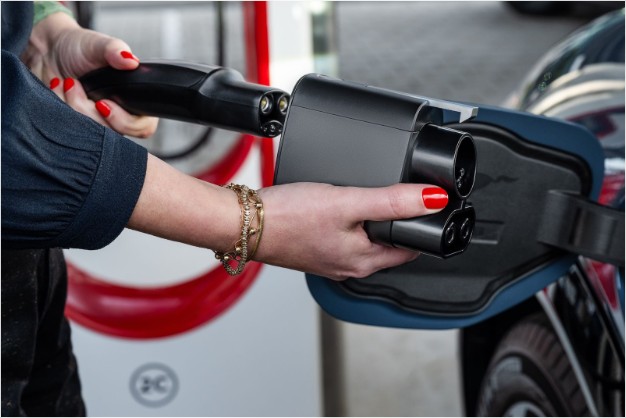
An EV charging adapter connects the cord from a public charging station to your car's charging port. When you stop to charge, you pull the charging cord close to your vehicle, then attach the adapter to the end of the charging cord. It will fit snugly. Then, you can plug the cord with the attached adapter into your car's charging port.
Below is an example of an NACS-to-CCS adapter for a vehicle with a CCS port. The charger uses the NACS (North American Charging Standard) port. However, the vehicle has a CCS port. To use the charging station, the driver needs an adapter with the NACS port.
How do I find the right adapter for my EV?
There are four common types of charging ports for EVs: J1772, CCS1, NACS (also known as J3400), and CHAdeMO. Use this table to find your car's charging type.
| Charging port design | Name | Vehicles that use it |
|---|---|---|

|
J1772 | Most non-Tesla vehicles. Used for at-home and public Level 1 or Level 2 charging. |

|
CCS1 | Most non-Tesla vehicles. Used for Level 1, Level 2, and DC fast charging (Level 3). Compatible with Level 1 and Level 2 charging stations using J1772. |

|
NACS (J3400) | All Tesla vehicles and some 2025 and beyond non-Tesla vehicles. Used for Level 1, Level 2, and DC fast charging. |

|
CHAdeMO | Some Japanese automakers, including models like the Nissan LEAF and Mitsubishi Outlander PHEV. Used for DC fast charging. Vehicles with this port also have a J1772 port for Level 1 and Level 2 charging. |
Tesla Superchargers use the NACS standard and have opened select Tesla charging stations to non-Tesla vehicles. That means that if you drive a non-Tesla vehicle, you might want an adapter that connects your port type to a NACS charger. If you're a Tesla driver and want to charge at non-Tesla public charging stations, you will need an adapter that connects to a J1772 or CCS1 charging port type. Moving forward, the good news is that major automakers have committed to using the NACS charging standard for all future vehicles, which will standardize charging ports as more vehicle models and infrastructure come online and make life simpler for you.
Before you go shopping for a new adapter, check with your car's manufacturer, since they might have a recommended one available. For example, Tesla includes a J1772 adapter with every vehicle purchase and offers a few other adapters for purchase. We highly recommend getting an adapter directly from the manufacturer for safety and practical reasons.
How can I ensure my adapter is of good quality?
We recommend purchasing an automaker-manufactured adapter that is:
- Specifically designed for your vehicle's make and model,
- Connects to a specific charging station type, and
- Is UL2252 certified.
This is the only adapter type accepted at some public charging networks, including EVgo. The consequences of using an incorrect or damaged adapter are serious: short circuiting, overheating, and vehicle or charger damage can occur.
Some public charging stations will provide adapters for you to use, like the Tesla Magic Dock, which is a built-in adapter at some Superchargers. These are safe to use when certified by the charging provider, but use common sense: Check the adapter for damage, and make sure it is the right one for your vehicle.
How can I charge safely with an adapter?
Step 1: Store your adapter securely to prevent any damage.
Step 2: Arrive at a public charging station and pull the charging cord close to your vehicle.
Step 3: Connect your adapter or a charging station-provided adapter to the end of the charging cord. Check the adapter for any signs of damage and make sure it fits snugly. Never use an extension cord with an adapter or use more than one adapter at a time.
Step 4: Gently plug the charging cord and adapter into your car and make sure it fits well. Initiate the charging session.
Step 5: After the charging session ends, unplug your vehicle (adapter included). Don't forget to detach your adapter and store it securely.
Happy (safe) charging! Here are some additional resources about charging with an adapter: